








Sphinx快速创建文档
写在前面
最近在学一些很新的东西,所以想把这些内容整理整理发出来,那么做成一个Document的形式是一种很有效而且很常见的形式;那么Sphinx这个框架首先就进入到了我的视线。主要,可以很轻松的创建文档,同时他可以在编译过程中输出多种格式,这样的效果是我们最为需要的,同时,其可以部署在Github Page上,相比较于Gitbook的简单的文档形式,Sphinx可以通过引用插件的形式进行更多的个性化操作。
部署环境
本地环境:Mac OS 13.0.1
线上部署:Github Page + Sphinx
在Mac环境下,可以用Homebrew快速安装Sphinx
# Homebrewbrew install sphinx-doc
#pippip install sphinx-doc创建项目
sphinx-quickstart #快速创建项目
# 1.设置项目的根目录Enter the root path for documentation.> Root path for the documentation [.]:
# 2.是否分离build和source目录(一半选择n)You have two options for placing the build directory for Sphinx output.Either, you use a directory "_build" within the root path, or you separate"source" and "build" directories within the root path.> Separate source and build directories (y/n) [n]:
# 3.设置前缀(默认)Inside the root directory, two more directories will be created; "_templates"for custom HTML templates and "_static" for custom stylesheets and other staticfiles. You can enter another prefix (such as ".") to replace the underscore.> Name prefix for templates and static dir [_]:
# 4.输入项目的名称和作者The project name will occur in several places in the built documentation.> Project name: Sphinx-test> Author name(s): test
# 5. 输入项目的版本号Sphinx has the notion of a "version" and a "release" for thesoftware. Each version can have multiple releases. For example, forPython the version is something like 2.5 or 3.0, while the release issomething like 2.5.1 or 3.0a1. If you don't need this dual structure,just set both to the same value.> Project version []: 1.0.0> Project release [1.0.0]:
# 6.文档语言If the documents are to be written in a language other than English,you can select a language here by its language code. Sphinx will thentranslate text that it generates into that language.
For a list of supported codes, seehttp://sphinx-doc.org/config.html#confval-language.> Project language [en]:
# 7. 设定文档的后缀The file name suffix for source files. Commonly, this is either ".txt"or ".rst". Only files with this suffix are considered documents.> Source file suffix [.rst]:
# 8.设定首页名称One document is special in that it is considered the top node of the"contents tree", that is, it is the root of the hierarchical structureof the documents. Normally, this is "index", but if your "index"document is a custom template, you can also set this to another filename.> Name of your master document (without suffix) [index]:
# 9.创建项目A Makefile and a Windows command file can be generated for you so that youonly have to run e.g. `make html' instead of invoking sphinx-builddirectly.> Create Makefile? (y/n) [y]: y> Create Windows command file? (y/n) [y]: y
Creating file ./conf.py.Creating file ./index.rst,.md.Creating file ./Makefile.Creating file ./make.bat.
Finished: An initial directory structure has been created.
You should now populate your master file ./index.rst,.md and create other documentationsource files. Use the Makefile to build the docs, like so: make builderwhere "builder" is one of the supported builders, e.g. html, latex or linkcheck.通过上面的步骤就可以在本地创建一个完整的Sphinx项目
.├── Makefile├── build├── make.bat└── source ├── _static ├── _templates ├── conf.py └── index.rst整个项目结构如上所,
- build:用来存放makefile生成的网页文件的目录
- source:文档的源代码
- conf.py:Sphinx的配置文件
- index.rst:主文档
后续配置
OK,到这里的话你的Sphinx项目已经创建好了,那么如何去配置这个Sphinx的情况,可以参考文章末尾的几个比较新手的使用手册,我也在一点点的摸索,所以大家一起学习一起交流。
部署到Github Page
部署到Github这个步骤对于经常使用Git的用户来说并不是很难,但是如何将一个编译好的静态文档同步上去主要面临以下几个问题:
- 如何只将一些代码和重要文件上传到Github仓库中去
- 在已经有一个Github Page的情况下如何去展示多个page页面
Step0 创建Github项目仓库
这一步的话我不用多做介绍了吧
Step1 设置同步省略文件
build/这个设置之后,很明显编译后生成的build文件夹,并不会随着Git的同步而一起同步到远端,
Step2 创建Github Action任务
这一步的话,还是不大清楚工作的具体原理是什么,目前知识感觉就是自己编写好的makefile直接放到线上环境中去执行;但是不晓得GitHub在这么多用户数量的情况下为什么会有这样的操作,这一步骤如果不清楚的话最好还是老老实实的去复制别人的文件去粘贴到自己的项目路径下(因为,我就是这么干的)
这部分的话未来找个具体的时间,可以好好的讲一讲
最后写个小插曲—关于如何在项目中使用Jupyter Notebook
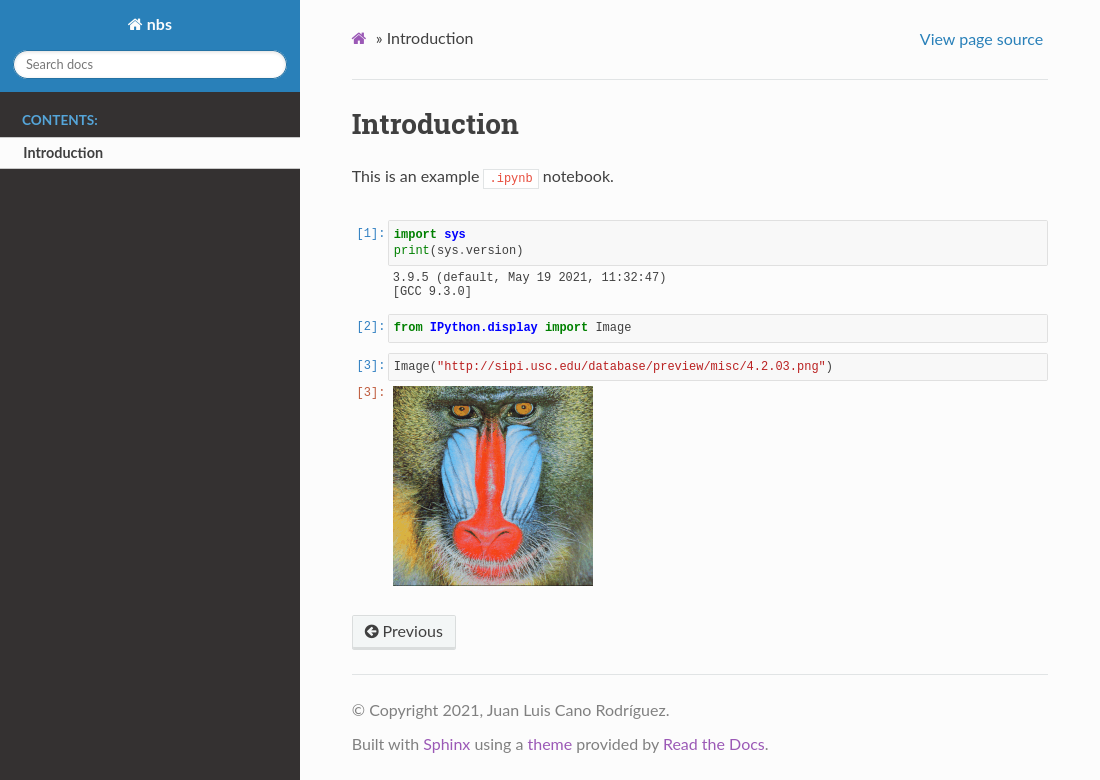
这个问题是在写一些可能会用到Jupyter中的代码和可视化结果展示的时候,具体的实现效果的话如图所示
-
在 conf.py文件中添加插件
extensions = ["nbsphinx",] -
将你的文件存储到项目根目录下(可以单独再去创建一个新的文件存放这些代码)
.. toctree:: :maxdepth: 2 :caption: Contents:
notebooks/Example 1参考文章
[1] 用Sphinx快速制作文档
[2] Sphinx官方文档
[3] Sphinx使用手册
支持与分享
如果这篇文章对你有帮助,欢迎分享给更多人或赞助支持!
部分内容可能已过时
音乐
暂未播放